
Why is my Tiranga withdrawal not received?
Tiranga withdrawals usually stall for one of four reasons: wrong payout details (IFSC, bank name or UPI ID), an unmet turnover requirement, money left in the 3rd party wallet, or a request still under review. Check the status in Withdrawal history, correct the detail in the Self Service Center and raise Withdrawal problem once.
Definition
What is a Tiranga withdrawal problem?
A Tiranga withdrawal problem is a payout that stays pending, fails, is rejected or shows as completed without reaching your account.
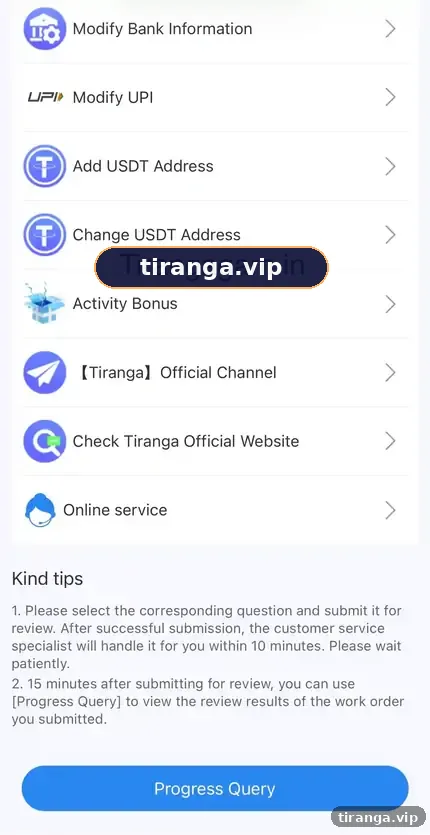
Each case has a different fix, so the first job is to read the status and any reason shown in Withdrawal history. The Self Service Center lists the tools you need: Withdrawal problem, IFSC Modification, Change bank name, Modify Bank Information, Modify UPI, Add USDT Address and Change USDT Address.
Diagnose
Which withdrawal problem do you have?
| Symptom | Likely cause | Fix |
|---|---|---|
| Pending for a long time | Under review or bank delay | Wait, then raise Withdrawal problem once |
| Rejected: account details | Wrong IFSC, name or account number | Use IFSC Modification or Modify Bank Information |
| Rejected: UPI | Phone number used as UPI ID, or typo | Use Modify UPI with your full UPI handle |
| Amount limited | Turnover requirement not met | Check bonus rules in Activity |
| Balance looks smaller | Funds in 3rd party wallet | Tap Main wallet transfer |
| Completed but not received | Bank credit delay | Wait for your bank, keep the order number, then raise a ticket |
Step by step
How do you fix a stuck Tiranga withdrawal?
- Read the status. Wallet, then Withdrawal history. Note the order number, amount and any reason.
- Check your payout details. Compare the IFSC, bank name, account number or UPI ID with your bank app.
- Correct the detail. Use IFSC Modification, Change bank name, Modify Bank Information or Modify UPI in the Self Service Center.
- Check turnover. If you claimed a reward, read its rules in Activity.
- Raise one ticket. Choose Withdrawal problem and add the order number and a screenshot.
- Track the result. Use Progress Query after about 15 minutes.
Turnover
How do turnover rules affect withdrawals?
Turnover (or wagering) means you must bet a certain amount before bonus money, or sometimes deposit money, becomes withdrawable.
For example, if a reward requires turnover equal to the bonus amount, you must place bets of that value first. The exact multiple is set in each reward’s rules. Our Tiranga bonus guide explains how to read them before you accept a reward.
Who it is for
Who runs into withdrawal problems most?
- First-time withdrawers who saved their phone number as the UPI ID.
- Players who claimed a bonus without reading the turnover rule.
- Anyone who played live casino or slots and forgot the 3rd party wallet.
New to cashing out? Read the Tiranga withdrawal guide first.
Prevention
How do you avoid withdrawal problems?
- Copy and paste your UPI ID from your UPI app rather than typing it.
- Double-check the IFSC against your bank’s website or passbook.
- Keep the payout account in your own name.
- Withdraw before claiming new bonuses if you want clean, unrestricted funds.
Scams
Beware fake “withdrawal unlock” offers
Nobody can unlock a Tiranga withdrawal for a fee.
If someone asks you to pay “tax”, a “release fee” or a deposit to unlock a withdrawal, it is a scam. Work only through the Self Service Center in your own account.
Our tiranga game support and safety homepage has more on spotting fake support.
FAQ
Tiranga withdrawal problem FAQ
Why is my Tiranga withdrawal pending?
It may still be under review or awaiting the bank. Avoid duplicate requests and raise Withdrawal problem if it stays pending.
Why was my Tiranga withdrawal rejected?
Usually wrong bank, IFSC or UPI details, or an unmet turnover rule. Read the reason in Withdrawal history.
How do I change my IFSC code on Tiranga?
Use IFSC Modification in the Self Service Center.
Can I use my mobile number as my UPI ID?
The platform’s reminder advises against it. Use your full UPI handle instead.
What if the status says completed but I have no money?
Bank credits can lag. Keep the order number and raise a ticket if it does not arrive.
Does rejected money return to my wallet?
Rejected withdrawals are normally returned to your balance. Check your Main wallet and history.
Summary
Key takeaways
- Read the status and reason in Withdrawal history first.
- Fix details with IFSC Modification, Modify Bank Information or Modify UPI.
- Check turnover rules and the 3rd party wallet before blaming the platform.
- Never pay anyone to unlock a payout.