
What do I do if I forgot my Tiranga password?
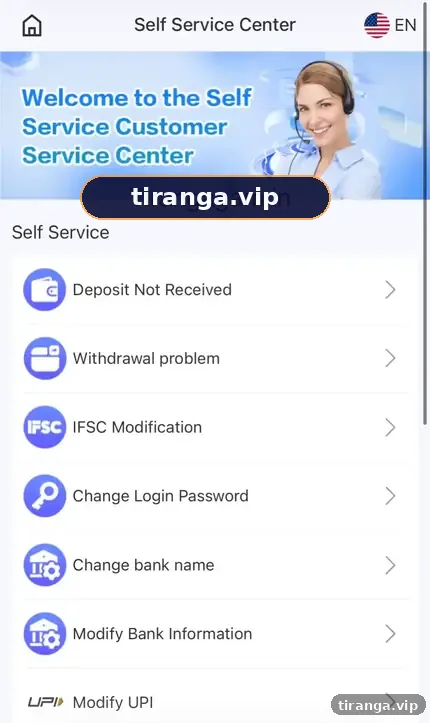
On the login screen, tap Forgot password? and follow the instructions, which point you to customer service to verify the account. If you are still signed in on any device, open the Self Service Center and choose Change Login Password instead, which is faster.
Definition
What is Tiranga password recovery?
Tiranga password recovery is the process of proving you own an account so you can set a new login password.
The login screen we captured states: “If you forget your password, please contact customer service.” There are two routes depending on whether you can still reach your account from any phone or browser.
Compare
Which password route should you use?
| Your situation | Route | Where |
|---|---|---|
| Locked out everywhere | Forgot password? and customer service | Login screen |
| Signed in on another phone or browser | Change Login Password | Self Service Center |
| Password works but you think it leaked | Change Login Password right away | Self Service Center |
| Saved password keeps failing | Clear autofill, retype it | Browser or app settings |
Locked out
How do you reset a forgotten Tiranga password?
- Open the login screen. Use your bookmarked link or the Log in button here.
- Tap Forgot password? It sits under the password field.
- Follow the instructions. You will be asked to contact customer service to verify the account.
- Prepare proof. Have your registered mobile number ready, plus recent deposit details such as a UTR if asked.
- Set the new password. Choose a strong one you do not use elsewhere, then sign in.
Signed in
How do you change your Tiranga login password?
- Open customer service. From the account menu, open 24/7 customer service to reach the Self Service Center.
- Choose Change Login Password. It is listed under Self Service.
- Submit the request. Fill in the form and submit once.
- Check Progress Query. After about 15 minutes, check the result, then sign in with the new password.
The Tiranga customer care guide explains every Self Service option and how Progress Query works.
Strong passwords
What makes a good Tiranga password?
Use at least 10 characters mixing words, numbers and symbols, and never reuse a password from email, UPI apps or social media.
- Avoid your name, date of birth or mobile number.
- A short phrase such as three unrelated words with a number is easy to remember and hard to guess.
- Store it in your phone’s password manager rather than a screenshot.
- Change it right away if you typed it on a page you are unsure about.
Who it is for
Who needs this guide?
Anyone who changed phones, has not logged in for weeks or suspects someone else knows their password.
If the problem is not the password but an error or loop, our Tiranga login problem guide will be faster.
Scams
What password scams target Tiranga players?
The most common one is a stranger offering to “reset” your account in return for your OTP.
Support will never ask for your OTP, UPI PIN or a payment to reset a password. Anyone who does is a scammer.
Only use recovery from the real login screen or the Self Service Center inside your account. For the rest of the platform, start at the Tiranga game account and games guide.
FAQ
Tiranga forgot password FAQ
Can I reset my Tiranga password with an OTP?
The login screen we captured directs you to customer service for forgotten passwords rather than an instant OTP reset.
How long does a Tiranga password change take?
Self Service tips say a specialist handles requests within about 10 minutes, with Progress Query available after 15 minutes.
Will changing my password affect my balance?
No. Your balance and history stay the same.
Can I change my password from the app?
Yes. The Self Service Center is available in the app and website.
What details might support ask for?
Usually your registered number and sometimes recent transaction details. Never your OTP or UPI PIN.
I changed my password but the app still fails. Why?
The app may be using a saved old password. Clear it and type the new one manually.
Summary
Key takeaways
- Locked out: tap Forgot password? and contact customer service.
- Still signed in: use Change Login Password in the Self Service Center.
- Use a long, unique password and store it safely.
- Never share an OTP or pay anyone to reset an account.