
How do I deposit money on Tiranga?
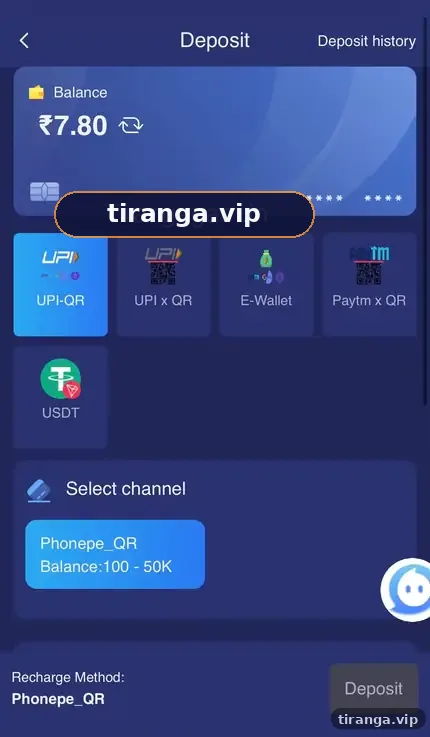
Open Wallet, tap Deposit, choose a method (UPI-QR, UPI x QR, E-Wallet, Paytm x QR or USDT), select a channel, pick or type an amount inside its range and pay exactly that amount in your UPI app. On the Phonepe_QR channel we checked, the range was ₹100 to ₹50,000.
Definition
What is a Tiranga deposit?
A Tiranga deposit is a payment from your own UPI, e-wallet or crypto wallet that adds rupees to your Main wallet.
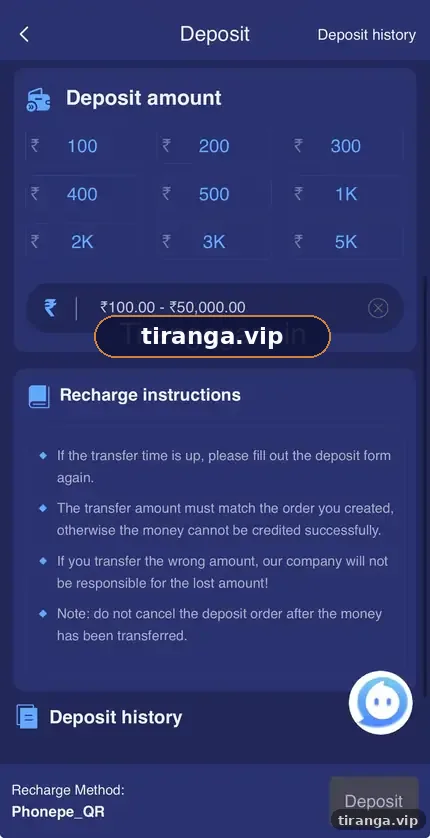
The Deposit screen we captured shows your current balance at the top, method tiles below it, a Select channel area with each channel’s range, preset amount buttons, a typed amount box and recharge instructions. A Deposit history link sits in the top right corner.
Methods
Which deposit methods does Tiranga accept?
| Method | How you pay | Notes |
|---|---|---|
| UPI-QR | Scan a QR with any UPI app | Phonepe_QR channel showed ₹100 to ₹50,000 |
| UPI x QR | Alternative UPI QR route | Use if UPI-QR is busy |
| E-Wallet | Wallet-based payment | Follow the on-screen app link |
| Paytm x QR | QR for Paytm users | Pay the exact amount |
| USDT | Crypto transfer | Use the correct network shown on screen |
A Fast Deposit banner in the app also advertised ARBPAY, WINPLAY and USDT options. Methods and channels change often; trust the list on your own screen.
Step by step
What are the Tiranga deposit steps?
- Open Wallet and tap Deposit. Check your current balance at the top.
- Choose a method. UPI-QR is the most common for Indian players.
- Select a channel. Each channel shows its own minimum and maximum.
- Choose the amount. Tap a preset (₹100 to ₹5K) or type an amount within the range.
- Tap Deposit. A payment page or QR appears.
- Pay the exact amount. Use your own UPI app and do not change the amount.
- Keep the UTR. Note the 12-digit UTR or transaction ID shown in your UPI app.
- Check Deposit history. The status should change to completed within a short time.
Rules
What do the Tiranga recharge instructions say?
The instructions on the deposit screen boil down to three rules: pay in time, pay the exact amount and do not cancel after paying.
- If the transfer time runs out, fill in the deposit form again rather than paying an old QR.
- The amount you pay must match the order you created, or the money may not be credited automatically.
- The platform says it is not responsible if you transfer to the wrong account, so never reuse an old payment link.
- Do not cancel the order after money has left your account.
Who it is for
Who should deposit, and how much?
Deposit only money you have already decided to spend on entertainment this week.
A sensible first deposit is the channel minimum, so you can learn the process and test a small withdrawal before adding more. Never deposit borrowed money, rent or bill money.
Problems
What if your Tiranga deposit does not arrive?
Do not pay again. Check Deposit history first, then raise Deposit Not Received with your UTR.
The full process is in our Tiranga deposit problem guide. Most delays are solved with the UTR and a screenshot of the payment.
Safety
How do you deposit safely?
- Only pay from the Deposit screen inside your own account.
- Never send money to a personal UPI ID given by an “agent” in a chat.
- Your UPI PIN goes only into your own UPI app, never into a website form.
- Screenshots of fake “credited” messages are common in scams; trust your Deposit history.
Anyone offering a “deposit bonus” if you pay them directly is running a scam.
The Tiranga game deposit and payments section of our homepage lists every money guide.
FAQ
Tiranga deposit FAQ
What is the minimum deposit on Tiranga?
On the Phonepe_QR channel we checked, the minimum was ₹100. Other channels can differ.
What is the maximum deposit on Tiranga?
The channel we checked showed ₹50,000. Check the range on your channel.
Can I deposit on Tiranga with Paytm?
Yes. Paytm x QR was listed as a method.
Does Tiranga accept USDT?
Yes. USDT was listed. Send on the network shown on screen only.
How long does a Tiranga deposit take?
UPI deposits are usually credited quickly once the payment succeeds. If not, check Deposit history and follow the problem steps.
Is there a first deposit bonus?
A banner advertised a First Deposit Bonus “up to ₹10,000”. Read its rules in Activity before you rely on it.
Summary
Key takeaways
- Wallet, then Deposit, then method, channel and amount.
- Pay the exact amount and keep your UTR.
- Never pay to personal UPI IDs or re-use old QR codes.
- Start with the minimum and test a withdrawal early.