
How do I contact Tiranga customer care?
Log in, open the account menu and tap 24/7 customer service to reach the Self Service Center. Pick the option that matches your issue, such as Deposit Not Received, Withdrawal problem or Change Login Password, or tap Online service to chat. Submissions are typically handled within about 10 minutes, and Progress Query shows the result after 15 minutes.
Definition
What is the Tiranga Self Service Center?
The Self Service Center is the platform’s built-in help desk, with a form for each common problem and a link to live online service.
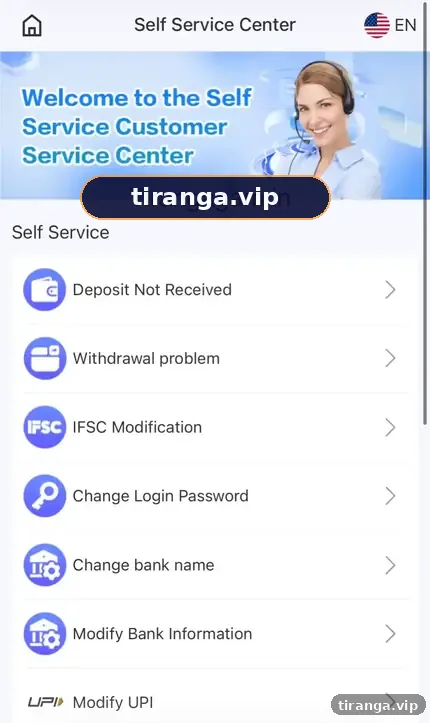
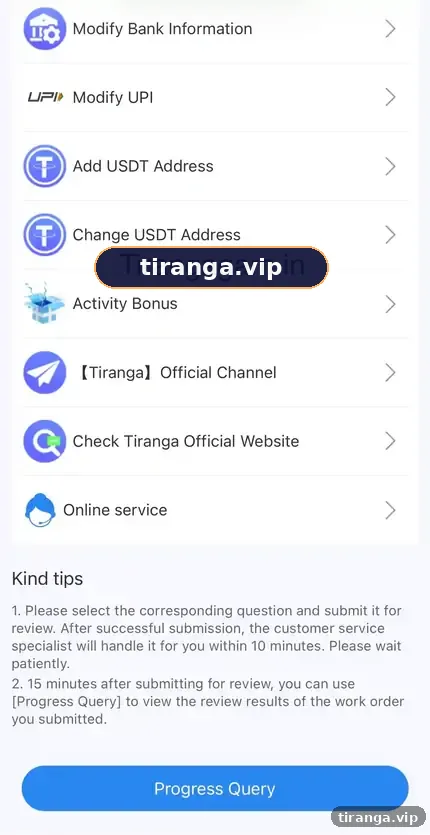
The screen we captured is titled “Self Service Center” with a 24/7 customer service banner, a tips box and a grid of options. The tips say a specialist processes submissions within 10 minutes and that you can use Progress Query after 15 minutes. Below the grid, an Online service button opens chat.
Options
Which Self Service option fixes which problem?
| Option | Use it when | Guide |
|---|---|---|
| Deposit Not Received | Paid but balance not credited | Deposit problem guide |
| Withdrawal problem | Payout pending, rejected or missing | Withdrawal problem guide |
| IFSC Modification | Bank IFSC code is wrong | Fix before withdrawing |
| Change Login Password | You know the old password | Password guide |
| Change bank name / Modify Bank Information | Bank details changed or wrong | Keep the account in your name |
| Modify UPI | UPI ID wrong or changed | Use your full UPI handle |
| Add / Change USDT Address | Crypto payout address | Double-check the network |
| Activity Bonus | Reward not credited | Read the reward rules first |
Step by step
How do you raise a Tiranga support ticket?
- Log in. Use your bookmarked link or the app.
- Open 24/7 customer service. From the account menu.
- Pick the matching option. Use the table above.
- Fill in every field. Order number, UTR, amount and time where relevant.
- Attach a screenshot. Clear, uncropped and showing the key details.
- Submit once. Duplicate tickets slow down review.
- Check Progress Query. After about 15 minutes, read the review result.
Live chat
When should you use Online service?
Use Online service when no form fits your issue or when a ticket result needs explanation.
Have your account number or phone, order numbers and screenshots ready. Explain in one or two clear sentences and avoid sending many messages at once. Never share your password, OTP or UPI PIN in chat; genuine support does not need them.
Who it is for
Who should use the Self Service Center?
- Anyone with a payment, payout, bank-detail or reward issue.
- Players who are locked out can start with the login problem guide, since Self Service needs you signed in.
If you cannot log in at all, the login page’s Forgot password option points you to customer service.
Fake support
How do you spot fake Tiranga customer care?
- Phone numbers on search results or social posts claiming to be “Tiranga helpline”.
- Agents who message you first on WhatsApp or Telegram.
- Anyone asking for a fee, your OTP, UPI PIN or remote access to your phone.
Real support works inside your account. Anyone outside it asking for payment is a scammer.
For general questions about this guide, use our contact page; we are an independent site and cannot access your account. The Tiranga game customer service homepage links every help topic.
FAQ
Tiranga customer care FAQ
Is Tiranga customer care available 24/7?
The Self Service Center is labelled 24/7 customer service.
How long does Tiranga support take?
Tips say submissions are handled within about 10 minutes, with Progress Query after 15 minutes. Complex cases can take longer.
Is there a Tiranga customer care number?
We saw no phone number inside the platform. Treat numbers posted online with caution.
What is Progress Query?
A Self Service option showing the review result of your submitted ticket.
Can this website fix my account?
No. We are an independent guide with no access to accounts. Use the Self Service Center.
What should I send to support for a deposit issue?
The order number, the 12-digit UTR and a screenshot of the payment.
Summary
Key takeaways
- Support lives in the Self Service Center under 24/7 customer service.
- Pick the matching option, attach a screenshot and submit once.
- Check Progress Query after about 15 minutes.
- Never share OTPs or pay “support agents” outside the platform.