
What do I do if my Tiranga deposit is not credited?
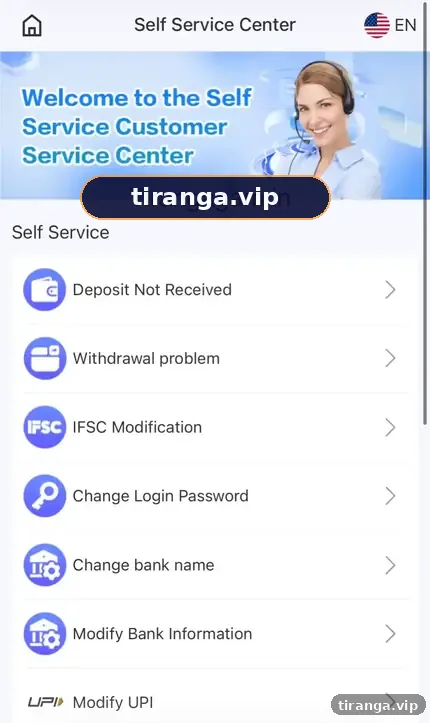
Do not pay again. Open Wallet, then Deposit history, to check the order status, copy the 12-digit UTR from your UPI app, then open the Self Service Center and submit Deposit Not Received with the UTR and a payment screenshot. Check Progress Query after about 15 minutes.
Definition
What is a Tiranga deposit problem?
A Tiranga deposit problem is any case where money left your bank or wallet but your Tiranga balance did not increase.
Common reasons include a delayed bank response, paying an amount different from the order, paying after the order expired or paying the wrong QR. In most cases the money is traceable through the UTR, the unique reference number every UPI payment gets.
Diagnose
Why did your Tiranga deposit fail?
| What happened | Status you may see | What to do |
|---|---|---|
| Bank shows debit, Tiranga shows pending | Processing | Wait a short time, then raise a ticket with UTR |
| Paid a different amount | Failed or not matched | Submit Deposit Not Received with UTR and screenshot |
| Paid after the timer ran out | Expired | Submit with UTR; never pay the same QR again |
| UPI app shows failed | Failed | Money usually returns to your bank automatically |
| Paid a QR from a chat or old screenshot | Not in your history | Contact your bank; it may not be the platform’s account |
Step by step
How do you get a missing Tiranga deposit credited?
- Check Deposit history. Wallet, then Deposit history. Note the order number and status.
- Find your UTR. Open your UPI app’s transaction details and copy the 12-digit UTR or reference number.
- Take a screenshot. Capture the payment details showing amount, date, time and UTR.
- Open the Self Service Center. From the account menu, open 24/7 customer service.
- Choose Deposit Not Received. Fill in the order details, UTR and upload the screenshot.
- Submit once. Duplicate tickets can slow things down.
- Check Progress Query. After about 15 minutes, view the review result.
UTR
Where do you find the UTR number?
The UTR is in the transaction details of your UPI app, often labelled UTR, UPI Ref No. or Transaction ID.
- PhonePe: History, tap the payment, look for UTR.
- Google Pay: Activity, tap the payment, look for UPI transaction ID.
- Paytm: Balance and History, tap the payment, look for UPI Ref No.
- Bank app: statement details for the debit usually show the same reference.
Who it is for
Who needs this guide?
Anyone whose payment shows success in their UPI app but not in Tiranga Deposit history or balance.
If your UPI app shows the payment failed, wait for the automatic refund to your bank first. If you paid through someone else’s link or personal UPI ID, the platform may have no record, which is why our Tiranga deposit guide says to pay only from your own Deposit screen.
Prevention
How do you avoid deposit problems next time?
- Pay the exact amount shown, within the time shown.
- Create a fresh order for every deposit; never re-scan an old QR.
- Keep your UPI app updated and avoid paying on weak networks.
- Save every UTR until the deposit shows as completed.
Scams
Watch out for fake “deposit recovery” agents
People who offer to recover your deposit for a fee are scammers.
Genuine support works through the Self Service Center inside your account. It never asks for your UPI PIN, OTP or an extra payment to release funds.
For other support options, see the Tiranga customer care guide or browse the Tiranga game help homepage.
FAQ
Tiranga deposit problem FAQ
How long does Tiranga take to fix a deposit problem?
The Self Service tips say a specialist handles submissions within about 10 minutes, with Progress Query available after 15 minutes. Complex cases can take longer.
Should I pay again if my deposit is pending?
No. Paying again can create a second problem. Wait and raise one ticket with the UTR.
What if I paid the wrong amount?
Submit Deposit Not Received with the UTR and screenshot so the team can match it manually.
Will my bank refund a failed UPI payment?
If the UPI app shows failed, banks normally reverse the debit automatically. Contact your bank if it does not appear.
What is Progress Query?
A Self Service option that shows the review result of a ticket you submitted.
Can I cancel a deposit after paying?
Do not cancel after money has left your account. Raise a ticket instead.
Summary
Key takeaways
- Do not pay twice; check Deposit history first.
- The UTR from your UPI app is the key to tracing a payment.
- Submit Deposit Not Received once, with a screenshot, then check Progress Query.
- Never pay anyone who offers to recover a deposit for a fee.