
Why is my Tiranga login not working?
Most Tiranga login problems come from five causes: the wrong tab (phone vs email), a typo in the number, an outdated saved password, an expired session or a copycat website. Check the address, pick the right tab, retype the password manually and clear the saved one; if it still fails, use Forgot password? or contact support from the platform.
Definition
What counts as a Tiranga login problem?
A Tiranga login problem is any error, loop or blank screen that stops you reaching your home screen after entering your details.
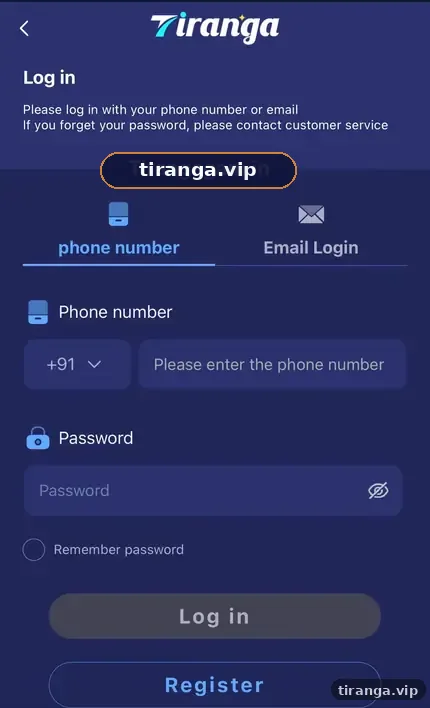
Some problems are on your side, such as autofill entering an old password. Others are temporary, such as maintenance or a slow network. A few are dangerous, such as a phishing page that looks like the real screen. The table below helps you tell them apart quickly.
Diagnose
Which Tiranga login error do you have?
| Symptom | Likely cause | Fix |
|---|---|---|
| “Wrong password” | Typo, caps or an old autofill password | Delete the saved password, type it manually with the eye icon on |
| Account not found | Wrong tab or number typed with 0 or spaces | Use the tab you registered with; type 10 digits only |
| Kicked out repeatedly | Expired session or logged in elsewhere | Log out, close the tab, sign in once on one device |
| Endless loading | Weak network or cached files | Switch Wi-Fi/mobile data, clear site data, retry |
| Page looks slightly different | Copycat site | Close it and open your bookmarked link |
| App will not open | Outdated or modified APK | Reinstall from Download APP inside the platform |
Step by step
How do you fix a Tiranga login problem?
Work from the simplest fix to the most involved; most people are back in by step 3.
- Check the address. Make sure you are on the link you trust, not a page from a chat or ad.
- Use the right tab. Phone accounts use the phone number tab; email accounts use Email Login.
- Retype the password. Clear any autofilled value, turn on the eye icon and type it slowly.
- Refresh the session. Log out everywhere you can, close the browser or app and open it fresh.
- Clear site data. In your browser settings, clear cookies and cache for the site, then retry.
- Recover the password. Tap Forgot password? or follow our Tiranga forgot password guide.
- Ask support. Use customer service from the login screen or the steps in our customer care guide.
Who it is for
Who usually gets locked out?
Lock-outs hit three groups most: people who changed phones, people who changed passwords on one device only and people who signed up through a copycat page.
If you registered through a fake page, your account may not exist on the real platform at all. In that case, register again from a trusted link with the Tiranga register guide and change any password you reused.
App issues
What if only the Tiranga app login fails?
If the website works but the app does not, the problem is the app file or its stored data.
- Clear the app’s storage in Android settings, then open it and sign in again.
- Uninstall and reinstall using Download APP inside the platform, never a forwarded file.
- On iPhone, delete the home screen shortcut and add it again from Safari.
Our Tiranga app download guide walks through a clean reinstall.
Scam alert
Could a login problem be a scam?
Yes. A “login problem” message from a stranger is one of the most common Tiranga scams.
Nobody from support will message you first asking for your OTP, password or a “verification payment”. Block and report such contacts.
Some fake pages show an error on purpose so you retype your password several times. If you suspect you entered details on such a page, change your password at once from the Self Service Center on the real platform. The safety section of our Tiranga game online guide explains how to check a site before you sign in.
FAQ
Tiranga login problem FAQ
Why does Tiranga say my password is wrong when it is right?
Usually autofill is inserting an older password or caps lock is on. Clear the field and type it manually with the eye icon on.
Why does Tiranga keep logging me out?
Sessions expire, and signing in on another device can end the first session. Use one device at a time and sign in fresh.
My account is not found. Is it deleted?
More often you are using the wrong tab or typing the number with a leading 0. Try the other tab and 10 digits only.
Can clearing the cache delete my Tiranga balance?
No. Your balance is stored on your account, not on the phone. Clearing site data only signs you out.
Tiranga login page is not loading at all. What now?
Switch between Wi-Fi and mobile data, try another browser and wait a few minutes in case of maintenance.
Who do I contact if nothing works?
Use customer service from the login screen or, once signed in on any device, Online service in the Self Service Center.
Summary
Key takeaways
- Check the address first; copycat pages cause the most dangerous login errors.
- Match the tab to how you registered and type 10 digits without a 0.
- Clear autofill and site data before assuming the account is broken.
- Never share an OTP or password with anyone offering to “fix” your login.