
How do I register on Tiranga?
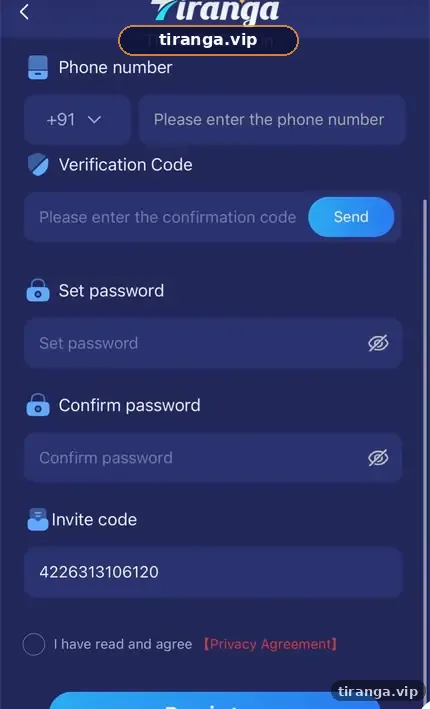
Tap Register, enter your +91 mobile number, tap Send and type the SMS verification code, set a password and confirm it, keep invite code 4226313106120 in the Invite code box, tick the agreement and tap Register. The account opens straight away and you can log in with the same number and password.
Definition
What is Tiranga registration?
Tiranga registration is the one-page sign-up form that creates your player account using a verified Indian mobile number.
The form we captured has five inputs: Phone number (with +91), Verification Code with a Send button, Set password, Confirm password and Invite code, followed by an “I have read and agree” checkbox linked to the Privacy Agreement. There is no document upload at this stage.
Before you start
What do you need to register on Tiranga?
You need four things ready before you open the form.
- An Indian mobile number that can receive SMS right now.
- A new password you have not used on any other site.
- The invite code, which our Register button fills in automatically.
- Confirmation that you are 18 or older and that online real-money games are allowed where you live.
Step by step
What are the Tiranga register steps?
- Open the form. Tap Register on this page; the Tiranga sign-up form opens with the invite code filled.
- Enter your number. Keep +91 and type your 10-digit mobile number.
- Get the SMS code. Tap Send, wait for the message and type the code into Verification Code.
- Set a password. Type it in Set password, then the same in Confirm password. Check both with the eye icon.
- Check the invite code. Make sure the Invite code box shows 4226313106120.
- Agree and submit. Tick “I have read and agree”, read the Privacy Agreement if you wish, and tap Register.
Once you are in, read our Tiranga deposit guide before adding money, and claim nothing until you understand the bonus rules.
Field guide
What does each Tiranga sign-up field mean?
| Field | What to enter | Common mistake |
|---|---|---|
| Phone number | 10 digits after +91 | Adding a 0 or spaces |
| Verification Code | The code from the SMS | Waiting too long; codes expire |
| Set password | A new, strong password | Reusing your email or UPI password |
| Confirm password | The same password again | A one-letter mismatch |
| Invite code | 4226313106120 | Deleting it, or pasting a stranger’s code |
| Agreement checkbox | Tick to accept the terms | Forgetting it, so Register stays inactive |
Troubleshooting
What if the Tiranga OTP does not arrive?
Wait 60 seconds, check signal and SMS filters, then tap Send once more.
- Make sure the number is typed correctly and the SIM is in the phone you are holding.
- Look in spam or promotions folders in your SMS app.
- Do not tap Send repeatedly; several requests can delay delivery.
- If the number was used before, the form may say it is already registered; use Tiranga login instead.
Who it is for
Who should register, and who should not?
Register only if you are an adult, you live where online real-money games are allowed and you can afford to lose what you deposit.
If you are under 18, borrowing money or hoping to fix a financial problem, do not register. Our responsible gaming page lists warning signs and practical limits.
After sign-up
What should you do right after registering?
- Bookmark the site. Or install it using the Tiranga app download steps.
- Save payout details carefully. Add a bank account or UPI ID in your own name before your first withdrawal.
- Set your budget. Decide a fixed weekly amount before the first deposit.
- Read the game rules. Open How to play in each game before betting.
For an overview of everything else, the Tiranga game India homepage links every guide.
FAQ
Tiranga register FAQ
Is Tiranga registration free?
Yes. Signing up costs nothing. You only need a working +91 mobile number.
Can I register on Tiranga without an invite code?
The field may be optional, but our Register button fills 4226313106120 for you. A code links your account to a referrer for the Promotion program.
Can I register with an email address?
The form we captured registers with a phone number. You can sign in with email later only if an email is added to the account.
How long does Tiranga registration take?
About two minutes if the SMS arrives promptly.
Can I have two Tiranga accounts?
Use one account per person. Multiple accounts can break the platform rules and block withdrawals.
Do I need KYC to register?
The sign-up form did not ask for documents. Payout details must still be in your own name.
Summary
Key takeaways
- Registration needs a +91 number, an SMS code, a password and the invite code.
- Keep 4226313106120 in the Invite code box when you sign up through our button.
- Use a unique password and never share the OTP.
- Set a budget and read the rules before your first deposit.