
How do I withdraw money from Tiranga?
Save a bank account, UPI ID or USDT address in your own name, tap Main wallet transfer to bring any 3rd party balance back, open Wallet, then Withdraw, enter an amount within your withdrawable balance and submit. Track the request in Withdrawal history.
Definition
What is a Tiranga withdrawal?
A Tiranga withdrawal is a request to send money from your Main wallet to a payout account you have saved.
Payout accounts can be a bank account (with the correct IFSC), a UPI ID or a USDT address. The Self Service Center includes options to modify bank information, change the bank name, modify UPI and add or change a USDT address, which tells you all three are supported.
Before you start
What do you need before withdrawing?
- A payout account in the same name as your Tiranga account.
- Any 3rd party wallet balance moved to the Main wallet.
- Any turnover requirement from bonuses completed.
- Your withdrawal password or verification, if the platform asks for one.
Step by step
What are the Tiranga withdrawal steps?
- Tap Main wallet transfer. On the Wallet screen, bring everything to the Main wallet.
- Open Withdraw. From Wallet, tap Withdraw.
- Add or choose a payout account. Bank, UPI or USDT, saved in your own name.
- Enter the amount. Stay within your withdrawable balance and any minimum shown.
- Submit the request. Read any fee or processing note on the screen first.
- Track it. Open Withdrawal history and watch the status.
UPI tips
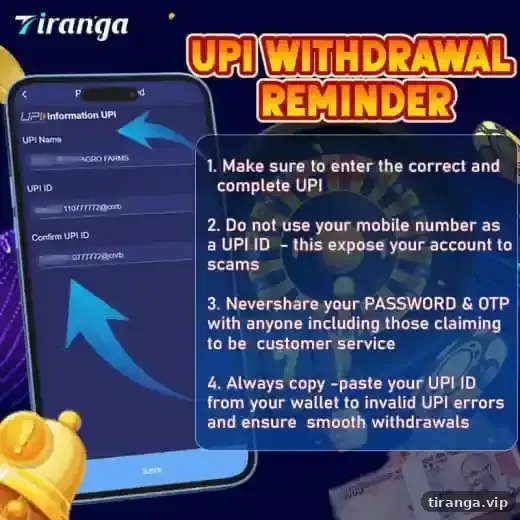
What does the Tiranga UPI withdrawal reminder say?
The platform’s own reminder banner lists four rules that prevent most failed payouts.
- Make sure you enter the correct and complete UPI ID.
- Do not use your mobile number as a UPI ID; the banner warns this can expose your account to scams.
- Never share your password or OTP with anyone, including people claiming to be customer service.
- Copy and paste your UPI ID from your UPI app to avoid typing errors and ensure smooth withdrawals.
Compare
Bank, UPI or USDT: which payout should you choose?
| Payout | What you need | Watch out for |
|---|---|---|
| Bank account | Account number, IFSC, exact bank name | Wrong IFSC is the top cause of rejections |
| UPI ID | Your full UPI handle such as name@bank | Do not use your phone number as the ID |
| USDT | Your own wallet address on the right network | Wrong network or address means lost funds |
If you need to correct details later, use IFSC Modification, Modify Bank Information or Modify UPI in the Self Service Center.
Who it is for
Who should read this before cashing out?
Every first-time withdrawer, and anyone who has claimed a bonus.
Bonuses can carry turnover rules that limit what you can withdraw. Check the reward rules in Activity, or read our Tiranga bonus guide, before you request a payout.
Status
What do Tiranga withdrawal statuses mean?
| Status | Meaning | Next step |
|---|---|---|
| Processing / pending | Request received and under review | Wait; do not submit again |
| Completed | Money sent | Check your bank or UPI app |
| Rejected / failed | Details or rules problem | Read the reason, fix it, submit a new request |
If a payout stays pending or fails, follow our Tiranga withdrawal problem guide.
Habits
How do you withdraw responsibly?
- Withdraw winnings above your starting budget rather than replaying them.
- Test a small withdrawal early so you know how the process works for you.
- Never let anyone else withdraw on your behalf.
Our Tiranga game withdrawal and wallet overview links every money topic.
FAQ
Tiranga withdrawal FAQ
What is the minimum withdrawal on Tiranga?
The minimum is shown on the Withdraw screen and can change. Check it before you request.
How long does a Tiranga withdrawal take?
Times vary with review and banking. Track the request in Withdrawal history and avoid submitting duplicates.
Can I withdraw to someone else’s bank account?
No. Use a payout account in your own name to avoid rejection.
Can I withdraw in USDT?
Yes. The Self Service Center has Add and Change USDT Address options.
Why can I not withdraw my full balance?
Part of it may be in the 3rd party wallet, or a bonus turnover requirement may still apply.
Can I cancel a withdrawal?
Once submitted it is usually under review. Contact Online service if you entered wrong details.
Summary
Key takeaways
- Save payout details in your own name; never use your phone number as a UPI ID.
- Tap Main wallet transfer before every withdrawal.
- Check turnover rules if you claimed a bonus.
- Track requests in Withdrawal history and submit only once.