
How does the Tiranga wallet work?
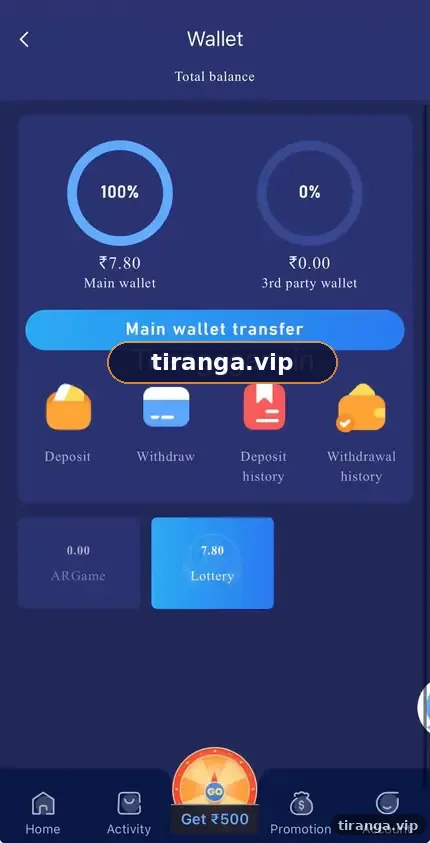
The Tiranga wallet shows your total balance split into the Main wallet and the 3rd party wallet. Lottery games use the Main wallet; partner casino and slot games move funds to the 3rd party wallet. Before you withdraw, tap Main wallet transfer to bring everything back to the Main wallet.
Definition
What is the Tiranga wallet?
The Tiranga wallet is the screen that holds your rupee balance and links to Deposit, Withdraw, Deposit history and Withdrawal history.
The wallet we captured shows a Total balance, two circular gauges for the Main wallet and the 3rd party wallet with a percentage of your funds in each, a blue Main wallet transfer button and four shortcuts: Deposit, Withdraw, Deposit history and Withdrawal history. Below that, tiles show the balance held by individual game providers.
Two wallets
What is the difference between the Main wallet and the 3rd party wallet?
| Wallet | Used for | Can you withdraw from it? |
|---|---|---|
| Main wallet | Deposits, Tiranga lottery games, withdrawals | Yes |
| 3rd party wallet | Partner games such as live casino, slots and some fishing games | Not directly; transfer to Main first |
When you open a partner game, part of your balance moves into that provider’s wallet. It usually returns when you leave, but not always. If your balance looks short, it is often sitting in the 3rd party wallet.
Step by step
How do you move money back to the Main wallet?
- Open Wallet. Tap the Wallet tab or the balance on the home screen.
- Check the gauges. If the 3rd party wallet shows more than 0%, funds are still with a provider.
- Tap Main wallet transfer. The platform pulls balances back from the providers.
- Confirm the new split. The Main wallet gauge should now show 100%.
History
Where do you find Tiranga deposit and withdrawal history?
Use the Deposit history and Withdrawal history shortcuts on the Wallet screen.
Deposit history lists each top-up with its status, amount and order number, which you need if a payment is not credited. Withdrawal history shows each payout request and whether it is processing, completed or rejected. Our Tiranga deposit problem guide and withdrawal problem guide explain each status.
Who it is for
Who needs to understand the wallet?
- New players making their first deposit.
- Anyone who played live casino or slots and now sees a lower balance.
- Players about to withdraw for the first time.
Balance issues
Why does your Tiranga balance look wrong?
| What you see | Likely reason | What to do |
|---|---|---|
| Balance lower after a casino game | Funds still in 3rd party wallet | Tap Main wallet transfer |
| Deposit not showing | Payment still processing or failed | Check Deposit history, then follow the deposit problem steps |
| Withdraw amount limited | Turnover requirement or bonus rules | Read the reward rules in Activity |
| Balance jumps after a reward | Bonus credited | Check Activity for any wagering conditions |
Rewards may carry turnover rules that limit what you can withdraw. The Tiranga bonus guide explains how to read them.
Good habits
How do you keep wallet spending under control?
Decide your budget outside the app and treat the wallet balance as already spent.
- Deposit only your planned amount for the week, never top up mid-session.
- Withdraw any win above your starting amount instead of replaying it.
- Check Deposit history weekly to see what you actually spent.
For the full money flow, read the Tiranga deposit guide and Tiranga withdrawal guide, or start from the Tiranga Game wallet and payments overview.
FAQ
Tiranga wallet FAQ
What is the 3rd party wallet on Tiranga?
It holds money used by partner game providers such as live casino and slots. Transfer it to the Main wallet before withdrawing.
Why is my Tiranga balance showing less?
Most often, part of it is in the 3rd party wallet. Tap Main wallet transfer.
Can I withdraw from the 3rd party wallet?
No. Move the funds to the Main wallet first, then withdraw.
Where can I see my Tiranga deposit history?
Wallet, then Deposit history.
Does Main wallet transfer cost anything?
We saw no fee on the transfer button. Check the screen for any notice on your version.
Is wallet money insured?
No. Your balance sits with the platform, not a bank. Withdraw what you do not plan to use.
Summary
Key takeaways
- The wallet has a Main wallet and a 3rd party wallet for partner games.
- Tap Main wallet transfer before every withdrawal.
- Deposit and withdrawal history are one tap away on the Wallet screen.
- Treat the balance as entertainment money and withdraw winnings.