
What is the Tiranga app?
The Tiranga app is the mobile version of the Tiranga Game platform: the same account, wallet and games in a full-screen layout with five bottom tabs (Home, Activity, Promotion, Wallet and Account). Android users install it from Download APP inside the platform; iPhone users pin it with Add to Desktop.
Definition
What does the Tiranga app include?
The Tiranga app is a full-screen wrapper around the platform, so everything you can do on the website you can do in the app.
On launch you see the Tiranga logo with Log in and Register buttons, a banner area, a scrolling notice, the eight category tiles (Popular, Lottery, Casino, Slots, Sports, Rummy, Fishing, Original) and a Platform recommendation row. Along the bottom, a centre button labelled with a reward offer sits between the Home, Activity, Promotion and Account tabs.
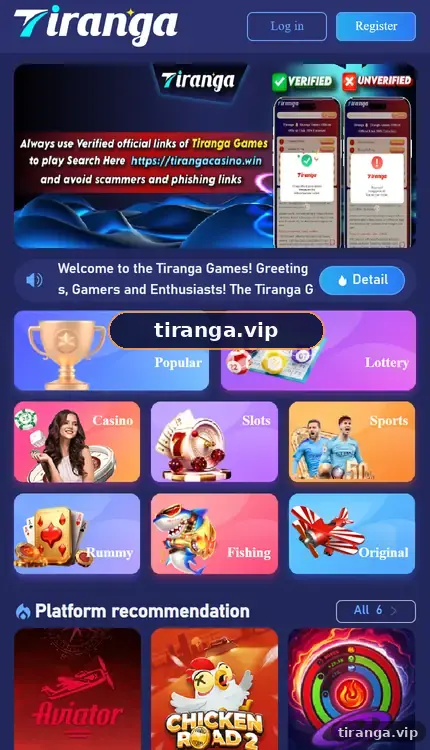
Tour
What does each Tiranga app tab do?
| Tab | What you do there | Guide |
|---|---|---|
| Home | Browse categories, banners and recommended games | Tiranga games list |
| Activity | Claim and read rewards: Attendance, Gifts, rebates | Tiranga bonus guide |
| Promotion | Agency program, invite link, QR code | Tiranga Promotion |
| Wallet | Balance, Deposit, Withdraw, history, transfers | Tiranga wallet |
| Account | Settings, customer service, Self Service Center | Tiranga customer care |
Compare
Tiranga app vs browser: which should you use?
Both use the same account; the app is more convenient, the browser needs no install.
| Feature | Android app | Add to Desktop shortcut | Browser tab |
|---|---|---|---|
| Install needed | Yes, APK file | No | No |
| Works on iPhone | No | Yes | Yes |
| Full screen | Yes | Yes | No |
| Updates | Reinstall newer file | Automatic | Automatic |
| Risk of fake copies | Higher if file is forwarded | Low | Low if bookmarked |
If you are unsure, start with the shortcut: it always loads the current version and cannot be a modified file.
Who it is for
Who benefits most from the Tiranga app?
- Players who sign in daily for the Attendance bonus and want one-tap access.
- People on slow networks, since a full-screen app shows fewer browser bars.
- Anyone who wants to avoid typing the site address and landing on copycat pages.
If you prefer not to install anything, the browser works the same, and our Tiranga login guide covers it.
Install
How do you get the Tiranga app?
Sign in on your phone browser, open the menu and choose Download APP (Android) or Add to Desktop (any phone).
- Sign in on your phone browser. Use a trusted link.
- Open the menu. Look for Download APP and Add to Desktop.
- Choose your route. Android: Download APP. iPhone: Add to Desktop.
- Open the new icon. Sign in again if asked.
The Tiranga app download guide has the full Android install steps and fixes for blocked installs.
Safety
How do you check a Tiranga app is genuine?
Only trust an app that came from the Download APP option inside the platform you signed into.
- Never install APKs sent in WhatsApp or Telegram groups, even if they look identical.
- The genuine app asks for your normal login, never for your UPI PIN or a “verification fee”.
- Be wary of apps that claim to include Win Go predictions or “VIP hacks”; these are scams.
- Remove the app from any phone you sell or give away.
Modified apps can record what you type. If you installed one, uninstall it, change your password from the Self Service Center and check your payout details.
Settings
Which settings matter in the Tiranga app?
Notifications, saved password and payout details are the three settings worth checking once.
Turn off notifications if they tempt you to play more than planned. Tick Remember password only on your own phone. Review your bank or UPI details before your first withdrawal so payouts go to an account in your own name. For a wider look at the platform, the Tiranga game app guide homepage has every topic in one place.
FAQ
Tiranga app FAQ
Is the Tiranga app free?
Yes, the app is free. Games inside use real money.
Is the Tiranga app on the Google Play Store?
We found it through Download APP inside the platform rather than an app store. Treat store listings using the name with caution.
Does the Tiranga app work on iPhone?
There is no iPhone APK. Use Add to Desktop or Safari’s Add to Home Screen instead.
Is my balance the same in the app and the website?
Yes. Both connect to the same account and wallet.
Why does the app ask to allow unknown sources?
Android shows this for any APK installed outside an app store. Allow it only for the file you got from Download APP.
How do I update the Tiranga app?
Download the latest file from Download APP and install it over the old version, or use the shortcut, which updates itself.
Summary
Key takeaways
- The Tiranga app is the same platform in full screen with five bottom tabs.
- Android: Download APP inside the platform. iPhone: Add to Desktop.
- Never install a forwarded APK or an app promising predictions.
- Your balance and history are identical across app and browser.