
How do I log in to Tiranga?
Open the Tiranga login screen, stay on the phone number tab with +91 or switch to Email Login, type your password and tap Log in. There is no separate username: you always sign in with the number or email you registered with.
Definition
What is Tiranga login?
Tiranga login is the sign-in screen that opens your account, wallet and game history using your registered phone number or email plus a password.
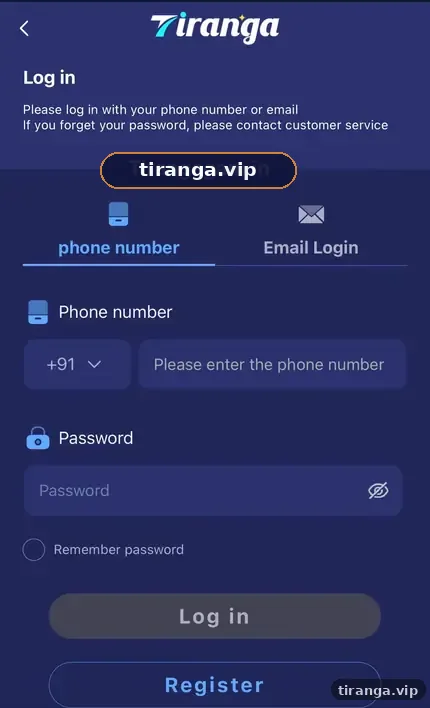
The same login works on the website, the Android app and the Add to Desktop shortcut, because all three connect to one account. The screen we captured says “Please log in with your phone number or email” and adds that if you forget your password you should contact customer service.
Step by step
What are the Tiranga login steps?
Four steps get you in: open the screen, choose the tab, enter the password, tap Log in.
- Open the login page. Tap Log in on this site; the Tiranga login screen opens in a new tab.
- Choose phone number. The +91 code is preselected. Type your 10-digit mobile number with no spaces or leading zero.
- Enter your password. Tap the eye icon to reveal it and check for typos before you submit.
- Tap Log in. Your home screen loads with your balance, the game tabs and the bottom menu.
Signed up with email instead? Tap the Email Login tab in step 2 and type the email address exactly as registered.
Screen guide
What does each part of the Tiranga login screen do?
| Element | What it does | Tip |
|---|---|---|
| phone number tab | Sign in with your +91 mobile number | Default tab; most accounts use it |
| Email Login tab | Sign in with an email address | Only works if your account has that email |
| Password field | Your case-sensitive password | Use the eye icon to check it |
| Remember password | Keeps you signed in on this device | Tick it only on a phone nobody else uses |
| Forgot password? | Starts recovery | Leads you to customer service |
| Register | Opens the sign-up form | For people without an account yet |
If you still need an account, the Tiranga register guide covers the form field by field.
Who it is for
Who needs this login guide?
It is for existing Tiranga account holders signing in on a new phone, a new browser or after a long break.
- Players switching from the browser to the app, or the other way round.
- Anyone whose saved password stopped working after a change.
- People who share a family phone and want to sign in without leaving their account open.
Stay safe
How do you keep your Tiranga login secure?
Treat your Tiranga password like a bank password: unique, private and never typed into a page you reached from a random message.
- Bookmark the login page or install the app so you never sign in from a search ad or chat link.
- Never share your password or OTP. Genuine customer service does not need them.
- Untick Remember password on any shared or borrowed device and log out when you finish.
- Change your password from the Self Service Center if you suspect anyone saw it.
A page that asks for your UPI PIN, card number or an “activation fee” during login is not the real platform.
Devices
Does Tiranga login work the same on the app and website?
Yes. Your balance, rewards and history follow your account, not the device.
On the Android app you get the same two tabs after opening it. On iPhone, the Add to Desktop shortcut opens the web login full screen. If the app keeps logging you out, see the Tiranga login problem fixes, and for app-only steps read the Tiranga app guide. New to the platform overall? The Tiranga Game homepage is the place to start.
FAQ
Tiranga login FAQ
Can I log in to Tiranga with my email?
Yes, if your account has an email address. Tap the Email Login tab, type the email and your password, then tap Log in.
Is there a Tiranga username?
No. You sign in with your registered phone number or email, not a separate username.
Do I need an OTP every time I log in?
The login screen we captured asked only for the number and password. The SMS code is part of registration.
Can I stay logged in on my phone?
Yes. Tick Remember password on a phone that only you use. Avoid it on shared devices.
What if I forgot my Tiranga password?
Tap Forgot password? and follow the instructions, or read our forgot password guide for the full recovery steps.
Can two people log in to the same account?
Do not share accounts. Each player should have their own account in their own name for withdrawals to work.
Summary
Key takeaways
- Sign in with your +91 number or email plus your password; there is no username.
- The same login works on the website, app and home screen shortcut.
- Use Remember password only on your own phone.
- Never type your login details into a page reached from a chat link.